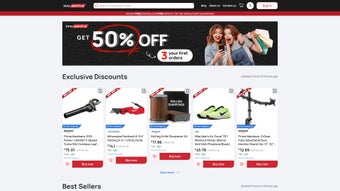

Download InnoSearch – AI Shopping Assistant, Real‑Time Product Recommendations, Free & Secure Tool
Finding the perfect product online can feel like searching for a needle in a haystack, especially when you’re juggling budget limits, brand preferences, and specific feature requirements. InnoSearch eliminates that hassle by pairing cutting‑edge generative AI with a curated e‑commerce catalog, delivering instant, conversation‑driven recommendations that feel personal, trustworthy, and completely free. Whether you’re shopping from a Windows PC, a macOS laptop, an Android phone, or an iPhone, InnoSearch works directly in your browser—no downloads, no ads, and no hidden fees.
Overview
InnoSearch AI Shopping Assistant, created by Patrick Long, is a web‑based AI‑driven companion that reshapes the way you discover and purchase products online. By harnessing the power of generative artificial intelligence, InnoSearch translates natural‑language queries into precise, real‑time product recommendations drawn from a curated e‑commerce data set. Whether you’re hunting for the latest tech gadget, a seasonal fashion piece, or a niche home‑office accessory, InnoSearch interprets the subtleties of your request—such as budget limits, brand preferences, or specific features—and returns a short, dynamically curated list of items that match your intent.
What sets InnoSearch apart is its blend of machine‑learning speed with expert‑level insight. The platform integrates vetted expert commentary into each recommendation, helping you weigh pros, cons, and long‑term value before you click “Add to Cart.” The interface is deliberately minimalist: a chat‑styled input field, a sleek product carousel, and optional themed collections (e.g., “Back‑to‑School Essentials” or “Holiday Gift Ideas”). While the service currently pulls data from a single e‑commerce partner, the depth of that catalog ensures broad coverage across dozens of product categories, from electronics and apparel to home décor and outdoor gear.
InnoSearch positions itself as a free, secure, and constantly updated shopping assistant. Because it operates entirely in the browser, there’s no software to install, no hidden fees, and your queries are processed over encrypted HTTPS connections. The platform also respects privacy, never storing personal identifiers beyond the session needed to generate recommendations.
In short, InnoSearch is designed for shoppers who value speed, relevance, and trustworthy guidance without the clutter of traditional price‑comparison sites.
Key Features & Usage Guide
Core Feature Set
- Natural‑Language Understanding: Type or speak a request like “lightweight running shoes under $100 for flat feet,” and the AI instantly parses intent.
- Real‑Time Product Curation: Recommendations are pulled live from the partner e‑commerce database, ensuring up‑to‑date pricing and stock information.
- Expert Insight Overlay: Each product card includes concise expert notes, highlighting durability, warranty, and best‑use scenarios.
- Themed Collections: Seasonal or interest‑based bundles (e.g., “Summer BBQ Essentials” or “Home Office Must‑Haves”) are auto‑generated based on trending searches.
- Chat‑Guarded Search: A conversational UI that keeps the experience fluid while allowing follow‑up questions without leaving the page.
- Dynamic Display: Interactive carousel with quick‑view details, price comparison, and “Add to Wishlist” functionality.
- Cross‑Device Compatibility: Works on any modern browser across Windows, macOS, Android, and iOS devices.
- Secure HTTPS Connection: All queries and data transfers are encrypted, safeguarding user privacy.
- Free Access & No Ads: Users enjoy a completely ad‑free experience without hidden subscription fees.
Step‑by‑Step Installation & Usage
Because InnoSearch is a web‑based application, there is no traditional installation process. Getting started is as simple as opening your preferred browser, navigating to the InnoSearch homepage, and optionally signing in to sync wishlists.
- Open a Supported Browser: Chrome, Edge, Firefox, Safari, or any Chromium‑based browser (minimum version 80).
- Visit the Official Site: Go to www.innosearch.com.
- Create an Optional Account: Click “Sign Up” to store wishlists and receive personalized theme updates. Account creation is optional for one‑off searches.
- Enter Your Query: Use the chat‑styled input at the top of the page. Example: “water‑resistant hiking backpack with laptop compartment.”
- Review Recommendations: Browse the carousel, read expert notes, and click “View Details” to open the product page on the partner e‑commerce site.
- Add to Wishlist or Cart: Click the heart icon to save for later, or the “Buy Now” button to be redirected to the checkout page.
- Optional PWA Installation: On mobile, tap the browser’s “Add to Home Screen” prompt to create a shortcut that launches InnoSearch in a full‑screen window.
Supported Operating Systems: InnoSearch runs on any device with a modern web browser, including Windows 10/11, macOS Ventura and later, Android 8.0+ (Chrome/Firefox), and iOS 13+ (Safari). Because it is browser‑based, performance is largely dependent on network speed and device processing power, not the underlying OS.
Performance Tips: For the fastest experience, use a stable broadband connection, clear browser cache periodically, and keep your browser up to date. The platform automatically adapts its UI for desktop, tablet, and smartphone screen sizes, ensuring a consistent user experience across all devices.
Pros, Cons & Detailed Review
Pros
- Instant, AI‑driven product discovery saves time compared to manual browsing.
- Broad coverage of product categories within the partnered e‑commerce ecosystem.
- Themed collections make seasonal shopping effortless.
- Expert insights provide trustworthy context for each recommendation.
- Ad‑free, free‑to‑use model with secure HTTPS communication.
- Responsive design works flawlessly on Windows, macOS, Android, and iOS.
- No need for software installation; works directly in the browser.
- Progressive Web App (PWA) support gives a native‑app feel without an app store.
- Privacy‑first approach with no third‑party trackers.
Cons
- Currently limited to a single e‑commerce platform, reducing price‑comparison breadth.
- Seasonal focus may lead to fewer recommendations for off‑season items.
- Some niche product categories are not yet indexed, limiting relevance for specialist shoppers.
- Chat‑guarded search occasionally returns broader results than expected, requiring additional filtering.
- Dynamic theme suggestions depend on trending data and may not align perfectly with individual taste.
Overall, InnoSearch delivers a compelling AI‑powered shopping experience that feels both futuristic and immediately useful. The combination of natural‑language understanding, real‑time data, and expert commentary bridges the gap between automated price‑comparisons and personalized shopping advice. While the single‑platform limitation is a notable drawback, the speed and relevance of the recommendations more than compensate for many users. For shoppers who value a streamlined, secure, and ad‑free environment, InnoSearch stands out as a top‑tier free tool.
Frequently Asked Questions
Is InnoSearch really free to use?
Yes. InnoSearch is completely free for all users. There are no hidden subscription fees, and the platform does not display third‑party advertisements. All revenue is generated through affiliate links when you complete a purchase on the partner e‑commerce site.
Can I use InnoSearch on my mobile device?
Absolutely. InnoSearch is built as a progressive web app, meaning it runs smoothly on Android and iOS browsers. You can also add it to your home screen for a native‑app feel without downloading anything from an app store.
How does InnoSearch protect my privacy?
All communications between your browser and InnoSearch servers are encrypted via HTTPS. The platform does not store personal identifiers beyond the current session, and any optional account information is kept separate from search queries. No third‑party trackers are embedded in the interface.
What happens if the recommended product is out of stock?
InnoSearch pulls live inventory data from the partner e‑commerce platform. If a product becomes out of stock after the recommendation is displayed, the product card will automatically update to show “Out of Stock” and suggest similar alternatives.
Can I customize the AI’s recommendation criteria?
While the AI automatically interprets your natural‑language input, you can refine results by adding explicit filters such as price range, brand, or specific features (e.g., “wireless headphones under $150 with noise‑cancellation”). The chat interface will adjust the recommendations accordingly.
Conclusion & Call to Action
InnoSearch AI Shopping Assistant redefines the online buying journey by blending generative AI with expert‑curated insights—all within a free, secure, and browser‑native environment. Its ability to understand nuanced, conversational queries and instantly surface relevant products makes it a valuable companion for anyone looking to save time and shop smarter. Although the current limitation to a single e‑commerce source and occasional seasonal bias are worth noting, the platform’s speed, usability, and privacy‑first stance outweigh these drawbacks for the majority of consumers.
Ready to experience AI‑enhanced shopping without the hassle of installations or hidden costs? Download InnoSearch now, start a conversation with the assistant, and let the technology do the heavy lifting for your next purchase. Your smarter, faster, and more informed shopping adventure begins with a single click.






